
How Do I Fix a Low Match Photo on My Vietnam E-Visa?
Retake your portrait and replace it with the Change button on the review step, before you pay. "Low match" means the portal's face check found your portrait and the photo on your passport scan too different. It's a warning, and the portal still lets you submit. If you do and the photo isn't good enough, Immigration sets your application to Amending and asks for a new photo. You fix it on the portal at no extra cost, but your e-visa is delayed. A fresh, front-facing photo on a white background, without glasses, is the fix.
What Should I Do Now?
| Where you are | What to do |
|---|---|
| Warning on screen, not paid yet | Retake the portrait and click Change to replace it. It takes about 5 minutes and costs nothing. |
| Already paid and submitted | Check your status daily on the official status page with your e-visa application number, email and date of birth. You can't swap the photo yourself after paying. If the status changes to Amending, Immigration wants a correction: upload the new photo through the portal, with no new fee. The request may appear on the portal without any email. |
What Do the Photo Warnings Mean?
On the review step, the portal's Face compare box puts your portrait next to the face on your passport page and shows two results: a Match percentage and an Image quality check. The example in the official guide shows Match 98.83% and Image quality: Pass. Vietnam Immigration doesn't publish a pass mark, so fix any low score before you pay. You may also see one of these messages:
| Message | What it means |
|---|---|
| Low match rate | Your portrait and passport photo don't look enough alike to the system. |
| Portrait photo was captured from another source. Your application may be rejected. Please upload another photo. Match is 55% | Your portrait looks like a copy of another photo, such as your passport photo or a printout. The number at the end is your score. |
| Portrait photograph incorrect (do not use passport photograph) | Immigration's reason when it asks for a new portrait: you uploaded your passport photo. |
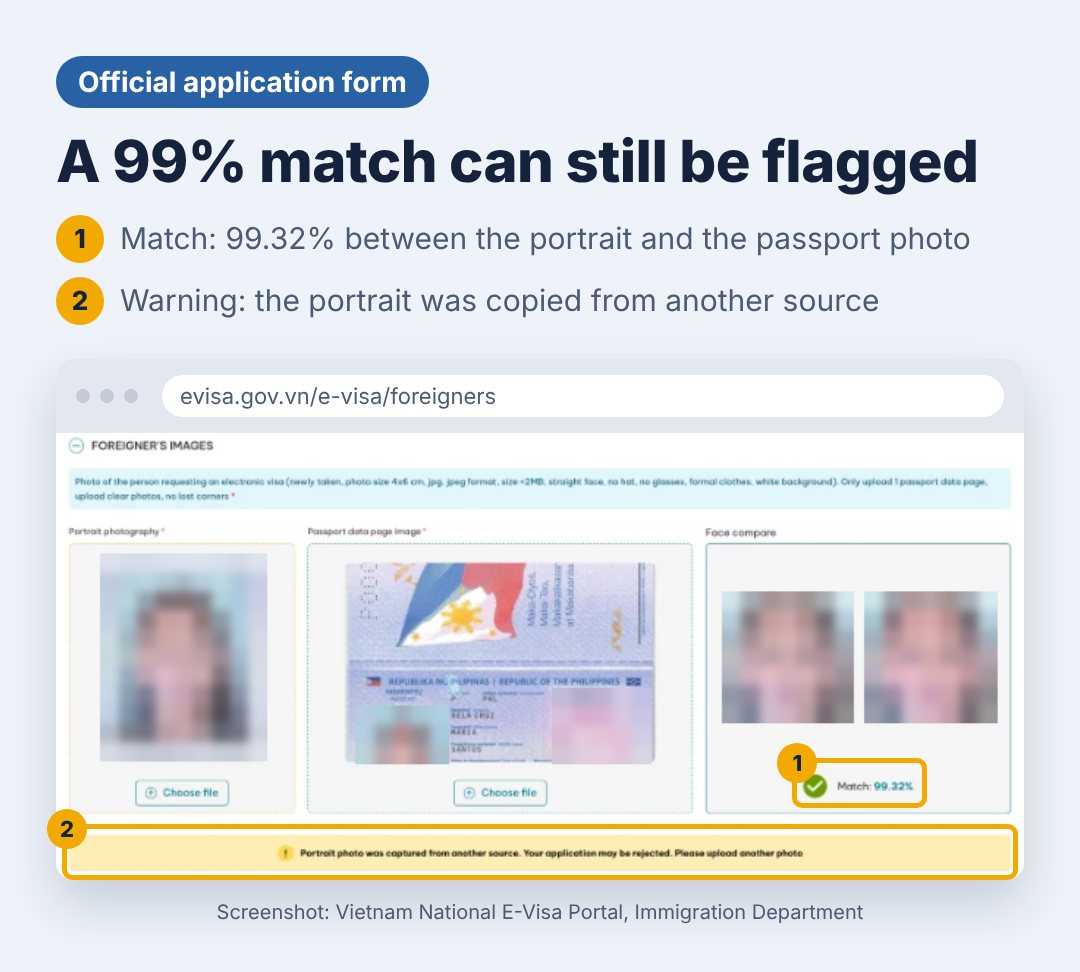
A high score doesn't clear you on its own. In the application below, the portrait matched the passport photo at 99.32% and still drew the warning, because the portrait was a copy of the passport photo.
What Match Score Should I Aim For?
Vietnam Immigration doesn't publish a minimum. Visa agencies that file thousands of applications rarely see a request for a new photo at 60% or higher, and often see one below 40%.
| Match score | What to do |
|---|---|
| 60% or higher | Submit. |
| 40–59% | Retake the portrait using the fixes below. If two new photos don't lift it, have the files checked before you pay. |
| Below 40% | Don't submit. Retake the portrait and rescan your passport page. |
Why Is My Match Low? Causes and Fixes
| Cause | Fix |
|---|---|
| Your passport photo is several years old (new beard, weight or hairstyle) | Look as close to your passport photo as you can: similar hairstyle and facial hair, no glasses, and similar light and posture |
| Portrait cut from your passport, an old photo or a printout | Take a new photo today |
| Glasses or a hat | Take them off |
| Head angle or expression different from your passport photo | Copy your passport photo: head straight, neutral face, mouth closed. If you don't smile in the passport, don't smile in the portrait. |
| Shadows or uneven light | Face a window and turn the flash off |
| Face too small in the frame | Crop so your face fills about 70–80% of the photo |
| Beauty filter or portrait mode | Turn both off |
| Passport scan with glare, blur or cut-off edges | Photograph the original page, not a photocopy. Lay it flat, hold the phone directly above it with the flash off, and keep all 4 corners and both lines of code at the bottom readable. If your name and passport number don't fill in automatically, the portal can't read the scan. |
Vietnam E-Visa Photo Requirements
The official portal asks for a recent, front-facing photo with no hat, no glasses, formal clothing and a white background.
| Item | Requirement |
|---|---|
| Size | 4x6 cm |
| Format | JPG or JPEG |
| File size | Less than 2 MB |
| Background | Plain white |
| Pose | Front-facing |
| Glasses and hats | Not allowed |
| Clothing | Formal attire |
| Age of photo | Recent, taken within the last 6 months |
| Passport scan | Full data page, both lines of code at the bottom visible, no glare. The portal reads your details from it. |
How Do I Retake My Portrait at Home?
- Stand about 50 cm in front of a plain white wall, facing a window.
- Ask someone to take the photo from about 1 m away, with the phone at your eye level and the flash off.
- Take off glasses and hats, keep hair away from your face with both ears visible, and wear a collared shirt or similar formal top.
- Look straight at the camera with a neutral face and your mouth closed.
- Crop the photo to a 2:3 portrait (4x6 cm), with your face filling about 70–80% of the frame.
- Save it as a JPG under 2 MB and upload it in the portrait field. Never upload the same file in both fields.
Short on Time?
A faster service gets your application decided sooner, but it still goes through the same photo check, so fix the photo first. We can get a new e-visa approved in as little as 1.5 working hours on weekdays, or speed up one you've already sent. Prices for each speed are in How Much Does a Vietnam E-Visa Cost? Start your application or message us 24/7 on WhatsApp at +84 38 533 5665.
Sources
- Vietnam National E-Visa Portal: Check application status.
- Vietnam National E-Visa Portal: Instructions, covering photo requirements, the Face compare check and the Change button on the review step.